mirror of
https://github.com/XTLS/Xray-install.git
synced 2025-12-10 02:09:52 +00:00
 cbc6bf326e
* Initial commit

* Testable

* Add description

* Instruction revision

* Fix wrong content

* Fix environment variables

* Correct variable location

* Content adjustment

* More precise content

* Replace '[[' with '['

* Fix mistakes

* Correct the output

* Fix case conversion

* Basically available

* Variable correction

* Complete basic revision

* Fix mistakes

* Fix the source of log files

* Make script more compatible and fails fast

* Update download link to v2fly and fix #2 Issue (#3)

* Update download link to v2fly.

* Update "Identify architecture"

* Fix  Line 56 variable name

* Try to fix verification_v2ray

* improve detect arm without vfp

* feat: install Xray-core

* docs: add English and Chinese Simplified

* Fix SHA

* Update install-release.sh

修改路径,跟https://github.com/XTLS/Xray-install保持一致

* Update xray

* Rewrite OpenRC

* cap: daemon with ambient and inheritable

* Fix README

* Use tab

* Fix README

* respawn period

* Fix README

* daemon: 3 panic in 10 minutes stops service

* README: rename files

* README: rename

* Migration: modify the path to fit this repo

* Migration: merge license

* Alpine: Fix shebang

* Alpine: check alpine

* Alpine: check root

* Alpine: refactor code related to architecture identification

* Alpine: shellcheck

* Alpine: shellcheck SC2181

* Alpine: shellcheck SC2002

* Alpine: Move global variable to main function to fix runtime error after refactoring

* Alpine: Hide debug information

* Alpine: Enhance script usability

- Add necessary user prompts for better feedback
- Exit on failure of rc service installation
- Reduce permissions for geoip and geosite files
- Rename install_software to install_dependencies

* Alpine: Add HTTP error handling to all curl commands

* README.md: Add Chinese translations

* README.md: Add link to Alpine Linux README for specific instructions

* Alpine README.md: Clarify content to remove ambiguity

---------

Co-authored-by: Dct Mei <dctxmei@gmail.com>
Co-authored-by: Loyalsoldier <10487845+Loyalsoldier@users.noreply.github.com>
Co-authored-by: Kslr <kslrwang@gmail.com>
Co-authored-by: Elvis Wang <me@elvisw.com>
Co-authored-by: 秋のかえで <autmaple@protonmail.com>
Co-authored-by: Markson Hon <50002150+MarksonHon@users.noreply.github.com>
Co-authored-by: winds365 <winds365@live.com>
2.7 KiB
2.7 KiB
Xray-install
用於在支持 systemd 的作業系統(如 CentOS / Debian / OpenSUSE)中安裝 Xray 的 Bash 腳本。
對於 Alpine Linux 使用者,請參考 Alpine Linux 專用說明 以獲取適用於 Alpine Linux 的安裝腳本和指南。
檔案系統層次結構標準 (FHS)
已安裝檔案:
- /etc/systemd/system/xray.service
- /etc/systemd/system/xray@.service

- /usr/local/bin/xray
- /usr/local/etc/xray/*.json

- /usr/local/share/xray/geoip.dat
- /usr/local/share/xray/geosite.dat

- /var/log/xray/access.log
- /var/log/xray/error.log
注意:Xray 預設不會將日誌記錄到 /var/log/xray/*.log。請配置 "log" 來指定日誌檔案。
基本用法
安裝並升級 Xray-core 和地理數據,預設使用 User=nobody,但不會覆蓋已有服務檔案中的 User 設定
bash -c "$(curl -L https://github.com/XTLS/Xray-install/raw/main/install-release.sh)" @ install
僅更新 geoip.dat 和 geosite.dat
bash -c "$(curl -L https://github.com/XTLS/Xray-install/raw/main/install-release.sh)" @ install-geodata
移除 Xray,但保留 json 設定檔案和日誌
bash -c "$(curl -L https://github.com/XTLS/Xray-install/raw/main/install-release.sh)" @ remove
進階用法
安裝並升級 Xray-core 到預發布版本
bash -c "$(curl -L https://github.com/XTLS/Xray-install/raw/main/install-release.sh)" @ install --beta
安裝並升級 Xray-core 和地理數據,並啟用 logrotate,$time 可以是 12:34:56 格式的時間
bash -c "$(curl -L https://github.com/XTLS/Xray-install/raw/main/install-release.sh)" @ install --logrotate $time
已安裝檔案:
- /etc/systemd/system/logrotate@.service
- /etc/systemd/system/logrotate@.timer
- /etc/logrotate.d/xray
安裝並升級 Xray-core 和地理數據,使用 User=root,會覆蓋已有服務檔案中的 User 設定
bash -c "$(curl -L https://github.com/XTLS/Xray-install/raw/main/install-release.sh)" @ install -u root
安裝並升級 Xray-core,但不包含地理數據
bash -c "$(curl -L https://github.com/XTLS/Xray-install/raw/main/install-release.sh)" @ install --without-geodata
移除 Xray,包括 json 設定檔案和日誌
bash -c "$(curl -L https://github.com/XTLS/Xray-install/raw/main/install-release.sh)" @ remove --purge
更多用法
bash -c "$(curl -L https://github.com/XTLS/Xray-install/raw/main/install-release.sh)" @ help
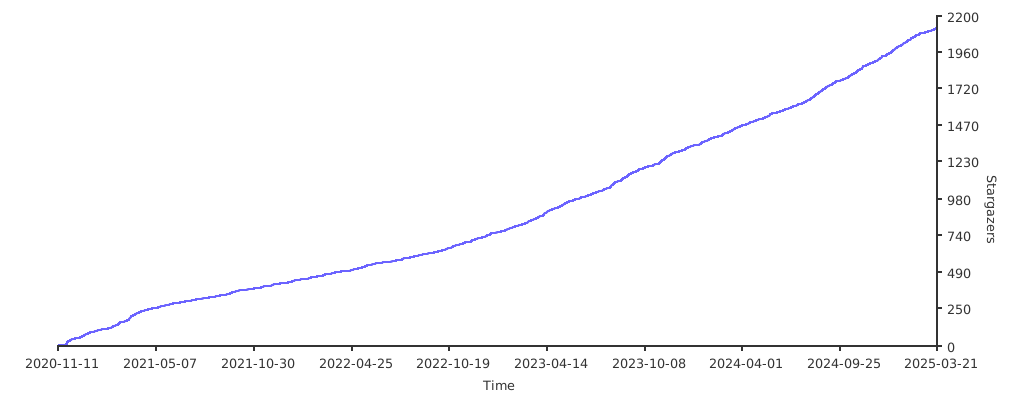
星標趨勢圖